Where do you see in Quipu how much IVA or income tax you are going to pay at the end of the quarter?
We are going to explain how you can estimate your quarterly results by having a quick look at Quipu's dashboard.
IVA
Important: make sure that the period you are looking at is the quarter you are currently in. In the example below, this is quarter 2.
Typically, your dashboard will look somewhat like this:
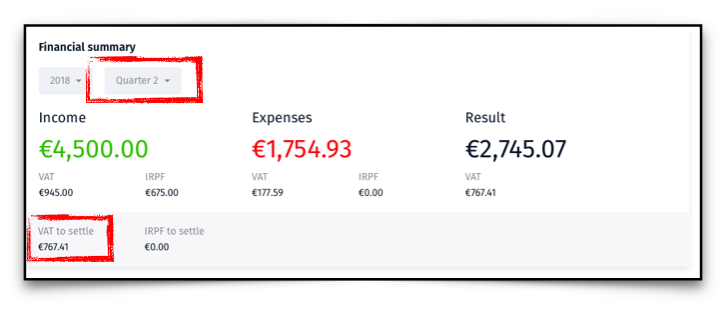
The amount of IVA that you will pay is under VAT to settle.
This amount is calculated by subtracting the VAT in your expenses and any VAT credit you may have from the VAT in your income.
Income Tax for self-employed workers
This tax is calculated with accumulated amounts of income and expenses, which makes it a bit more complicated.
To estimate the tax result, make sure that the period you are looking at this time is the full year.
This time, your dashboard may look somewhat like this:
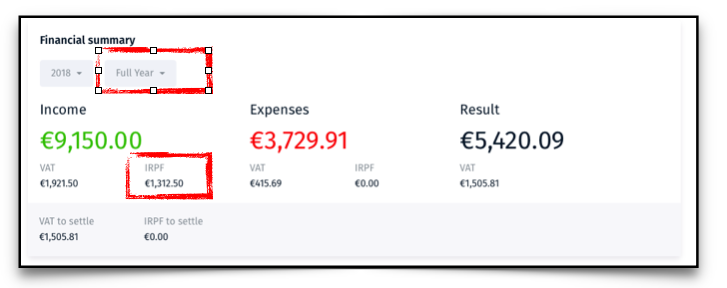
Notice that the highlighted figure under IRPF, on the income side, is the total of retentions, or withheld tax, that you may have included in your invoices.
For most autonomos, this number will be nil.
Estimating the tax
Once you have all the elements clear, your estimated tax can be worked out.
- Step 1: work out 20% of result. In our example: EUR1,084.02.
- Step 2: subtract retentions, or tax already paid. EUR1,084.02 minus EUR1,312.50 = -EUR228.48.
- Step 3: subtract the amount of income tax already paid in previous quarters.
If the result is negative, there is no more tax to pay.
Actually, you have overpaid tax and, if things remain the same at the end of the year, you will get a tax rebate.
This method is an approximation because other allowances may be applied at the time of tax filing, resulting in further reductions.
Quipu is included without additional cost in all our accounting plans.